
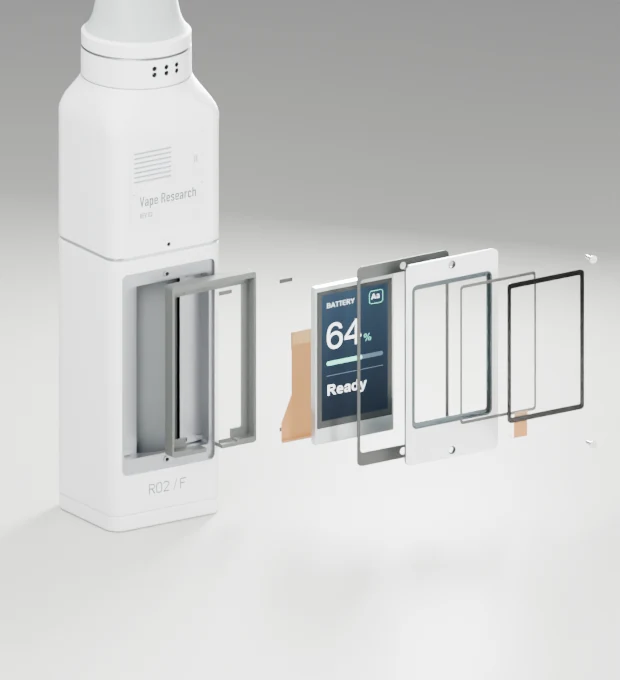
The proposed white variant uses a projected-capacitive touchscreen. The EastRising ER-TFT1.14-2 is a non-touch IPS LCD. Its eight-pin display tail carries the LCD interface. Touch needs its own transparent electrodes, electrical connection and controller. A touch event provides input to the display interface. It grants no permission to energize the heater or charge the cell. EastRising outline and pin assignment
Electronics and optical stack
| Element | Proposed implementation | Design evidence still required |
|---|---|---|
| Window and electrodes | Laminate a custom transparent mutual-capacitance sensor to the inside of the protective window. Bring the electrode routes to the window edge in the dry bay. Preserve the continuous perimeter bond and gasket. | Sensor-vendor stack drawing, electrode pitch, tail bend radius, laminate thickness, optical loss, viewing angle, reflections, delamination after thermal and humidity cycling. |
| Touch controller | Evaluate Microchip ATMXT144U as a controller candidate. It supports I²C and up to 144 sensing nodes. Place the controller close to the sensor flex on the dry side. Select its supply, decoupling, reset, interrupt pull-up, ESD protection and connector against the datasheet and host voltage. | Confirm load per electrode, achievable signal through the actual window, assembly grounding, host pin budget, power and whether a smaller controller would suffice. Board placement, routing and firmware remain open. Microchip controller |
| Display and host | Keep the LCD driver on its SPI interface, with separate backlight control. The host receives touch reports and updates the display. Backlight switching and charger noise can couple into the sensor. | Test noise during charging and display changes, stuck I²C lines, flex open/short, startup, brownouts, controller resets and idle drain. Keep the touch tail out of the antenna-like loop formed by high-current conductors. |
| Interlocks | Use a separate inhibit path for the heater and charger. An uncertain sensor, suspected moisture, service fault or out-of-range cell temperature keeps the relevant output disabled even if the screen still responds. | Inject false touches and communication failures and measure actual output current. Check that restarting the UI or disconnecting the display cannot clear a hardware fault. |
Interaction on a small wet surface
The active surface is only 14.86 mm wide, so use one generous tap target and one primary action per view. Avoid two tiny adjacent buttons, press-and-hold overrides or gestures that resemble wiping water off the glass. A tap can wake the screen or show more information. Display-only settings may be adjustable. Keep lockout messages readable when input is disabled. Touch sensing and mechanical vibration are independent features; a haptic actuator would need a separate power, mounting and sealing assessment.
Water droplets, a salt film, condensation, gloves and a wet finger can all change electrode capacitance. The controller supplier advertises moisture performance. The proposed assembly still needs its own validation. Suppress ambiguous events and require a clean release before accepting the next deliberate action after recovery. The touch controller cannot establish that the interior or charging contacts are dry.
Validation
Use unpowered optical samples first to check readability, glare and target size. Then test an isolated, instrumented electronics prototype with the heater and actual charging load disconnected. Compare intentional taps, missed taps, unintended actions and recovery across dry, damp, wet, gloved, pocket-contact and wiping conditions. Repeat after drops, cleaning and cold-to-humid transitions. Measure false activation and failure to inhibit using electrical instrumentation before any powered product-use evaluation. Report the simulated interface separately from physical touch, ingress or thermal performance. Environmental design review